Photo Guide
Content 02 · Field standardsGangnam Station employment photos:
Outfit, hair and expression preparation
If you are preparing for a Gangnam Station employment-photo shoot, first check the employer's photo rules, target role, outfit, and hair. The photo should connect naturally to how you look in an interview. G.STUDIO finds expression and posture during the shoot, then retouches only within a range that preserves your features.
Print dimensions and online pixel or file requirements can differ. Submission rules → target role → outfit → hair → makeup consultation Check them in that order, and follow the latest conditions in the notice and submission site.
When choosing a studio for job application photos, check how the photographer coaches expressions and helps you select an image. Compare the included services in job application photo prices and options.
Before your shoot
Check what you have confirmed. Guidance for unchecked items remains below. Your choices and personal information are not stored.
- Submission rules First check the photo size, background, file format and size limit on the employer's or receiving agency's notice or submission site. Requirements vary by destination.
- Target role Choose your outfit and expression with the role and organization's atmosphere in mind. A photo alone cannot establish job suitability or guarantee hiring; prepare a result that naturally resembles you.
- Outfit Prepare a suit or top appropriate for the role and check the collar, shoulders and color before the shoot. G.STUDIO offers free outfit rental for job application photos, so you can review the options on site.
- Hair Tidy hair around the eyebrows, eyes and face; review it again under studio lighting.
- Makeup consultation Professional makeup is not always necessary. Note any concerns about your eyebrows, eyes or skin tone so that after shooting you can discuss only what needs adjustment in the actual photo.
Order of checks
Employment-photo preparation checklist: check these five items first
- Submission rules — Distinguish a print rule that specifies physical dimensions, such as 3×4 cm, from an online rule that specifies pixels, file format, or file size. The latest notice from the employer or submission site takes priority over this general guide.
- Target role — Consider the tone required by the organization and role—such as finance, public service, service, research, or creative work—when choosing the direction of your outfit and expression. A photo alone cannot guarantee role fit or a hiring result.
- Outfit — Check whether the collar, shoulder line, color, and wrinkles look stable in a front-facing photo rather than focusing only on whether the outfit is a suit. Bring your own outfit or check rental availability before the shoot.
- Hair — Tidy the fringe and side hair so they do not cover the eyebrows, eyes, or facial outline too much. In a photo, lighting and camera height can make loose strands and the part look more prominent.
- Makeup consultation — Note in advance which eyebrow, eye-area, or skin-tone details concern you and how natural you want the result to be. In-person makeup and AI adjustments to the photo after the shoot have different roles, so confirm the product and scope separately.
Prepare at home / adjust together on site
At home, first check the information required by the submission site and target role. On site, work with the photographer to adjust how your actual face, outfit, lighting, and expression appear in the photo.
| Preparation item | Prepare at home | Adjust together on site |
|---|---|---|
| Submission rules | Check the photo size, background, file format, and file-size limit in the employer or institution's notice and submission site. | Use the confirmed rules to review the framing, background, and final file details together. |
| Target role | Think about the target role and the organization's tone, then decide the direction for your outfit and expression. | Keeping the role's desired impression in mind, adjust an expression, posture, and angle that feel natural for your face. |
| Outfit | Prepare a suit or top suited to the role, and check the collar, shoulder line, and color. | If you need outfit rental, confirm it on site and adjust the collar and shoulder line to fit the framing. |
| Hair | Tidy the fringe and side hair so they do not cover the eyebrows, eyes, or facial outline too much. | Under the lighting and front-facing framing, adjust the hair flow and loose strands around the face together. |
| Makeup consultation | Note the eyebrows, eyes, and skin tone you are usually concerned about, along with how natural you want the result to feel. | After the shoot, review the actual photo, discuss only what is needed, and confirm the scope of AI makeup and retouching together. |
How are expression and posture adjusted during the shoot?
For a Gangnam Station employment photo, expression and posture are not fixed after one decision. We check one frame during the shoot, then make small adjustments to face direction, chin height, gaze, mouth corners, and shoulder tension in the next frame.
If the expression becomes stiff, first exhale briefly and release tension in the jaw and around the mouth. If the shoulders rise, lower the arms and shoulders once, keep the back upright, and look comfortably near the lens rather than staring at the camera.
This is not about applying the same smile to everyone. It is about finding an expression that connects naturally to the submission purpose and your own face. Retouching cannot create a relaxed expression or posture after the fact, so securing a good state during the shoot comes first.
How should you prepare your outfit, hair, and makeup?
Consider the target role and the organization's tone first, but the more direct check is whether the collar and shoulder line stay stable in the photo. Bring a suit or top from home, or check rental availability before the shoot if needed.
Tidy the fringe and side hair so they do not cover the eyebrows, eyes, or facial outline too much. On site, check loose strands, the part, and the boundary between collar and hair under front lighting and framing.
Makeup is not meant to turn your real face into someone else. Tell us in advance which eyebrows, eyes, or skin-tone details concern you; after the shoot, we can review the actual photo and discuss the needed photo-only adjustments. Check the product information before booking to see whether professional makeup or AI makeup applies.
How far does retouching go after the shoot?
Retouching for a Gangnam Station employment photo refines the impression in the photo; it does not create a new real-life face. We preserve the basic face shape, eyes, nose, mouth, and expression from the shoot while addressing visible left-right balance, jawline, or skin-tone details as needed.
AI retouching is not a matter of running an automatic tool once.
The photographer reviews the captured photo, uses AI tools manually to refine only the necessary areas, and checks the result with the customer. Excessive retouching is not applied because it can widen the gap between the photo and the real person.
03 · Price, inclusions, and check date
G.STUDIO Gangnam employment-photo products and prices
The prices below were checked on Naver Place on September 13, 2026. The employment AI package's shoot, prints, files, and rental details are based on the product information on this website. The AI makeup option is listed separately at ₩10,000; before booking, confirm the package contents and whether the makeup is already included.
G.STUDIO Gangnam Naver Place listed prices · checked September 13, 2026
| Service | Price | Notes |
|---|---|---|
| Employment photo AI package (consultation booking) | ₩50,000 | Shoot · 1:1 monitoring · two backgrounds · 16 prints · photo file · suit rental: website product information. Confirm options and final inclusions before booking. |
| [Separate option] AI makeup | ₩10,000 | Listed separately from the basic shoot price. Confirm the scope before booking. |
| Clothing rental | free | Free with an employment-photo shoot |
| ID / half-size portrait [3×4 cm] | ₩40,000 | Price shown on Naver Place |
| Passport + driver's license/ID + ID photo (all) | ₩50,000 | Price shown on Naver Place |
| Professional profile photo | ₩80,000 | Price shown on Naver Place |
Price checked: September 13, 2026 · Separate listing: AI makeup option ₩10,000. The website describes AI natural makeup in the Employment AI package, so confirm before booking how it relates to the separate option. Free outfit rental and one-to-one retouching follow the website's employment-photo information; this table alone does not establish print or file inclusions for other products.
Frequently asked questions
Frequently asked questions about employment photos
How should I check the submission rules?
The employer's posting and submission site come first. A physical print size such as 3×4 cm and online requirements for pixels, file type, or size limit can be different, so check each one. Follow the posting if it specifies JPG, JPEG, PNG, or another format.
Do I need to prepare a suit or outfit?
If you can prepare your own outfit, bring a top or suit suited to the target role and check how the collar and shoulder line appear in the photo. G.STUDIO's employment-photo product information lists suit rental as free. If you need an on-site rental, check the latest operating terms before booking.
Do I need professional makeup for an employment photo?
Professional makeup is not necessary for every customer. Whether your usual makeup is enough or you need an AI makeup consultation after the shoot depends on your desired result and product. Tell us in advance what concerns you about your eyebrows, eyes, or skin tone so we can decide the scope from the actual photo.
How far does the retouching go?
The photographer reviews the captured photo and adjusts only what is needed while preserving your basic features and expression. We do not greatly change the eyes, nose, or face shape, create a face unlike the real person, or promise an employment outcome.
Can I receive a file for online submission?
Check file delivery and the required file type, size, and pixels against both the selected product and the submission site's requirements. Review the current price table's inclusions and the latest Naver Place information before booking. This guide does not invent pixels for individual postings.
What should I tell you when booking?
Tell us the shooting purpose, submission rules, target role, and whether you need outfit rental or a makeup consultation when you book. This helps us prepare the on-site guidance. Prices and product contents can change, so check the latest Naver Place information before booking.
Source 1 · Customer reviews
Customer review introduction
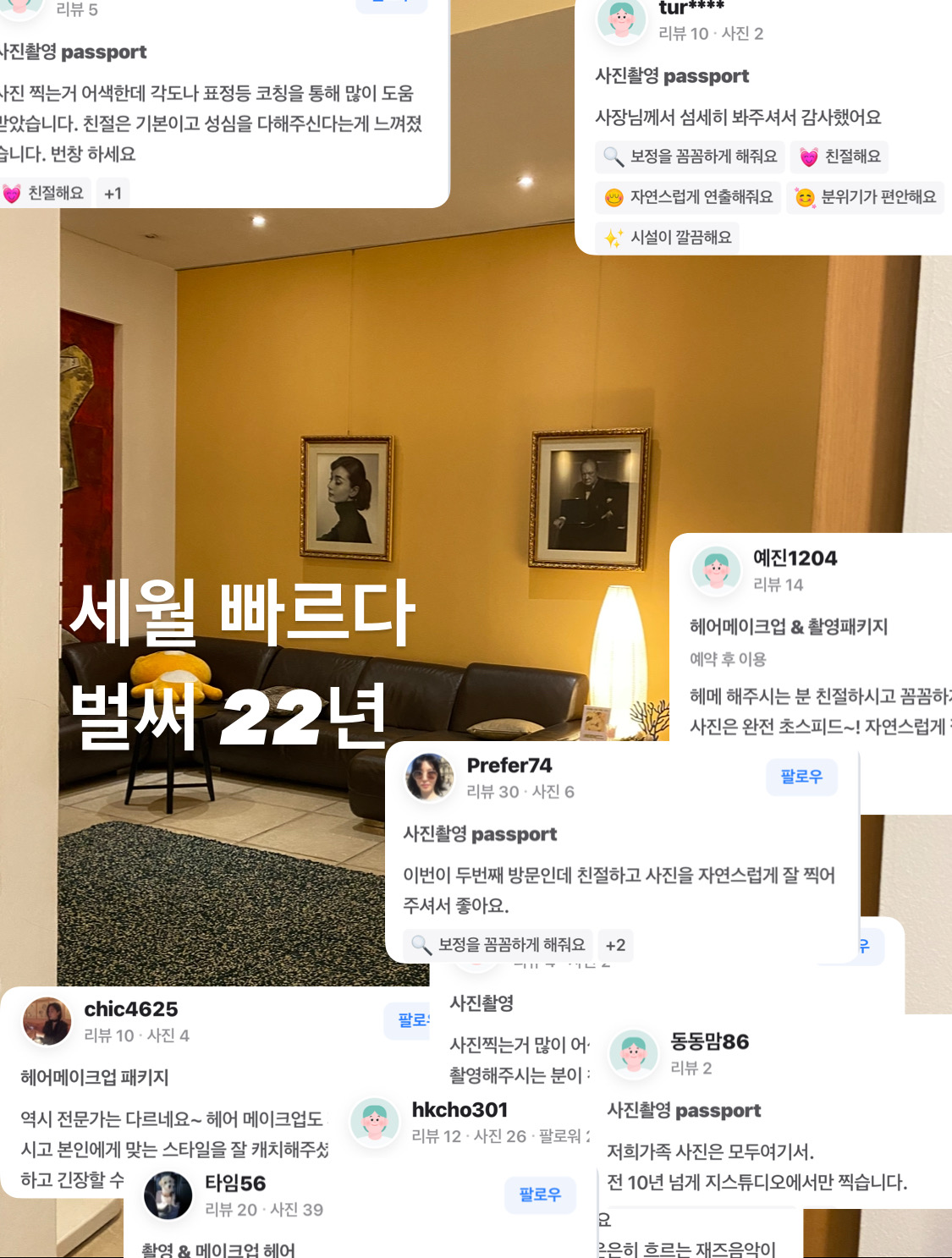
The provided review examples describe customers' experiences with angle and expression coaching, natural shooting, careful retouching, and a comfortable atmosphere. For an employment photo, the expert's guidance during the shoot matters as much as the result.
This image introduces the provided review screens; it is not a survey statistic of all customers' satisfaction. The wording and numbers in the reviews should not be interpreted as an overall customer average or official figures.
Source 2 · Content and media source
How have G.STUDIO's shooting standards been described in media coverage?
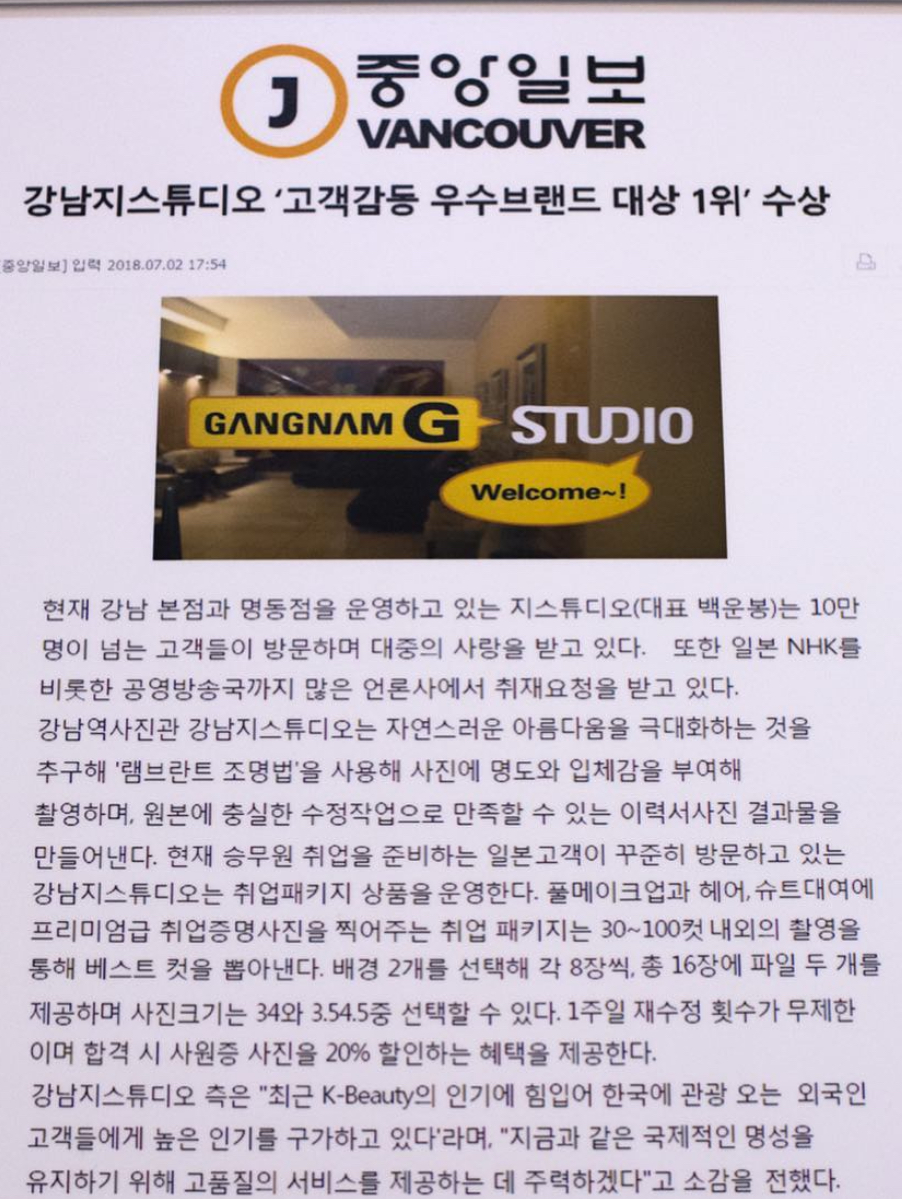
The headline in the provided article capture is “Gangnam G Studio wins No. 1 in the Customer Delight Excellent Brand Awards.” The captured body describes the Gangnam Main and Myeongdong locations at that time, more than 100,000 customer visits, media coverage, Rembrandt lighting, faithful original-image retouching, and an employment package.
We present this record as material from that time showing G.STUDIO's long-standing emphasis on natural beauty and faithful retouching. However, the visitor count, branch operations, product details, and benefits in the article reflect the 2018 reporting period and should not be treated as current conditions or latest figures. Please use the latest information on the website for current services and booking terms.
How should you prepare for an employment photo?
A good employment photo shows both the applicant's real appearance and a good impression.
Find an expression and pose suited to the individual, prepare makeup and hair naturally, and use the photographer's manual AI work to finish only what is needed.
The photo and the real person should connect naturally.
G.STUDIO Gangnam photographs ID, job application and portrait photos near Gangnam and Sinnonhyeon Stations.